Cursive Text Not Showing? Fix Unicode Display Issues Now
The frustration is real. You've just used an amazing online tool to create the perfect fancy cursive text for your social media bio or a creative project. You copy it with excitement, but when you paste it, all you see are empty boxes (☐☐☐), question marks (???), or other random symbols. If this sounds familiar, you're not alone.
This common problem is known as a Unicode display issue. It happens when a device or platform can't recognize the special characters used to create stylized text. This can be incredibly disappointing, especially when you've spent time crafting the perfect look. But don't worry, it's usually fixable.
In this guide, we'll demystify why this happens and give you practical solutions to fix it. We'll help you ensure your beautiful cursive text appears exactly as you intended, everywhere you use it. With our reliable cursive generator, you can create stunning text confidently. Plus, you'll know exactly how to troubleshoot any issues that come up.

Understanding Why Fancy Text Sometimes Disappears
Before we jump into the fixes, it helps to understand what's happening behind the scenes. The "fancy text" you generate online isn't actually a font in the traditional sense. It's a series of special characters from a universal standard called Unicode. When these characters don't show up, it's a sign of an incompatibility somewhere along the line.
How Unicode Characters Work Across Different Systems
Unicode is a global standard that assigns a unique number to every character, symbol, and emoji. This is what allows you to see text in different languages or use emojis on your phone. The cursive, bold, and script styles you generate are created using specific Unicode characters that look like letters but are technically symbols.
For these symbols to display correctly, two things are needed. First, your device's operating system (such as iOS, Android, or Windows) must have the right font file. Second, the specific app you're using (like Instagram or your browser) must also include a visual representation for that character. If the font file is missing that specific character, the system doesn't know what to display. That's when it shows a placeholder, like an empty box, often called a "tofu" character.
The Device Divide: Why Your Phone Shows What Your Computer Doesn't
Have you ever noticed that your fancy text looks perfect on your iPhone but is a mess on your friend's older Android device or your work laptop? This is a classic example of the "device divide." Different operating systems and even different versions of the same OS come with different sets of pre-installed fonts.
For example, Apple's devices (iPhones, iPads, Macs) often have very comprehensive font support, so they can render a wide range of Unicode characters without any issues. However, some Android devices or older Windows PCs might have more limited font libraries. If they don't have the necessary font to display a particular cursive character, they will show the dreaded empty boxes.

Quick Fixes for When Cursive Text Shows as Boxes or Question Marks
When you see those frustrating boxes or question marks, your first instinct might be to give up. But there are several quick fixes you can try to resolve the problem. The solution often depends on where you are trying to paste the text.
Platform-Specific Solutions for Instagram, TikTok & Facebook
Social media platforms are the most common places people use fancy fonts. However, each platform has its own quirks when it comes to displaying Unicode characters.
- Instagram: Generally has good support for fancy text in bios, captions, and comments. If your text isn't showing, try using a slightly different cursive style from a cursive text generator. Some character sets are more widely supported than others.
- TikTok: Similar to Instagram, TikTok supports many Unicode characters, especially in bios and video text overlays. If you encounter issues, the problem is likely the viewer's device, not TikTok itself. Sticking to more popular script styles can increase compatibility.
- Facebook: Facebook can be tricky. While it supports many characters in posts and comments, it sometimes filters or blocks certain fancy text styles, especially in names. If your text is being blocked, try a less complex style.
Browser & Font Settings That Might Be Blocking Fancy Text
Sometimes, the issue isn't the website or platform but your own web browser. Your browser settings might be configured in a way that prevents it from rendering certain Unicode characters properly. This is more common on desktop computers.
First, ensure your browser is up-to-date. Newer versions have better and more updated font support. If that doesn't work, check your browser's font settings. Some browsers allow you to set default fonts, and if you've chosen a very basic font, it might override the display of special characters. Try resetting your browser's font settings to their defaults to see if that resolves the issue.
Device Compatibility Checklist: What to Check First
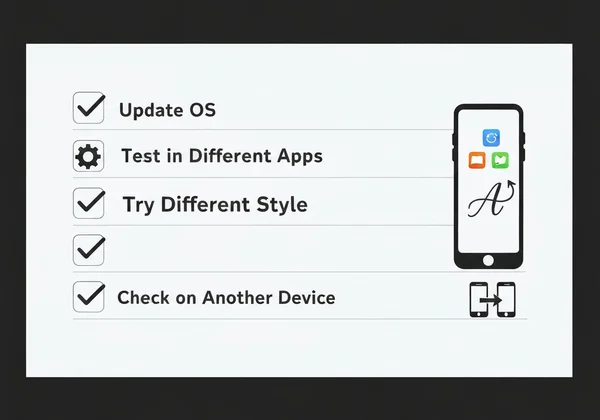
If you're still having trouble, run through this quick checklist to pinpoint the problem. This systematic approach can save you a lot of time and frustration.
- Update Your OS: Make sure your phone, tablet, or computer has the latest operating system update installed. These updates often include expanded font libraries and better Unicode support.
- Test in Different Apps: Paste the text into a different application on the same device. For example, try pasting it into your Notes app. If it appears correctly there, the problem is with the specific app (like Facebook or WhatsApp), not your device.
- Try a Different Style: Go back to your fancy text generator and choose another style. Some styles, like those based on mathematical alphanumeric symbols, have wider support than more obscure decorative ones.
- Check on Another Device: Ask a friend to view the text on their device. If it looks fine for them, it confirms the issue is with your specific device's font support.
Preventing Future Issues: Best Practices for Using Cursive Text
Fixing problems is great, but avoiding them in the first place is even better. By adopting a few best practices, you can use stylish cursive text with much greater confidence and fewer display errors. This ensures your message is seen by the widest audience possible.
Creating Fallback Text That Works Everywhere
One of the limitations of fancy Unicode text is that it can't be read by screen readers used by visually impaired individuals. It can also cause issues with search engine optimization (SEO) because search engines may not recognize the characters as standard text.
Here's a pro tip: always include the plain text version alongside your fancy text whenever possible. For instance, in a YouTube video description, use a stylized title for visual appeal, but also add a plain text version below it. This way, everyone—whether using assistive technology or different devices—can understand your content, making it both accessible and beautiful.
Testing Your Text Before Sharing Across Multiple Platforms
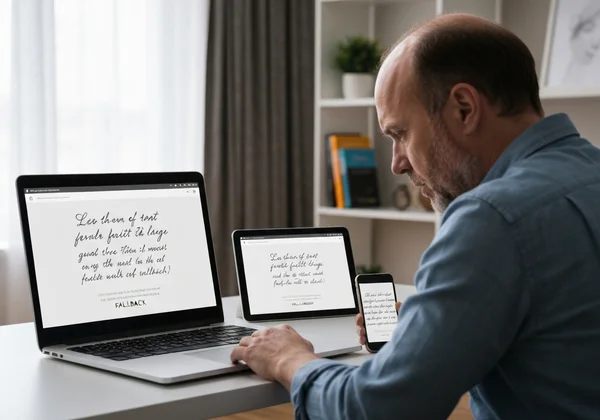
The golden rule for using custom fonts is simple: test, test, test. Before you publish that important social media post or update your professional bio, take a moment to see how it looks on different devices and platforms.
A simple way to do this is to paste your generated text into a cross-platform app like Telegram or send it to a friend who uses a different type of phone. You can also use online device emulators to preview how your text will render on various screens. A few seconds of testing can save you from publishing a bio full of unreadable boxes. When you're ready to create your text, our online tool is the perfect place to start.
Your Cursive Text Will Display Perfectly With These Solutions
Don't let empty boxes ruin your creative vibe! Now that you know how Unicode, device fonts, and platform quirks affect your fancy text, you've got the power to fix any display issues. Update your system, test your text across devices, and choose universally supported styles to make your digital content shine with personality!
The key is to remember that these "fonts" are actually special characters. Knowing this helps you make smarter choices about where and how to use them. With these solutions in hand, you can confidently create and share stunning text that displays flawlessly for your audience.
Ready to create perfect cursive text that everyone can see? Visit CursiveGenerator.org today and explore our wide range of stylish, copy-and-paste fonts with confidence!
Cursive Text Display Issues
Why do some cursive text characters show as empty boxes?
Empty boxes, often called "tofu," appear when your device's operating system or the application you're using doesn't have the font data needed to display that specific Unicode character. Essentially, your device recognizes that a character should be there but doesn't know what it looks like. Updating your device or trying a more common style from a reliable generator can often fix this.
Can I use fancy cursive text in Instagram bios and captions?
Yes, absolutely! Instagram has excellent support for a wide variety of Unicode characters. This makes it one of the best platforms for using fancy cursive text in your bio, post captions, stories, and comments. If a specific style doesn't work, simply select a different one, as some are more universally compatible than others.
Why does my cursive text work on my phone but not my computer?
This common issue is due to differences in the font libraries installed on each device. Modern smartphones, especially iPhones, are equipped with very extensive font sets that can render most Unicode characters. An older desktop computer or one with a minimal OS installation might lack these fonts, causing it to display boxes instead.
Are there any cursive fonts that work everywhere without issues?
Unfortunately, no single Unicode cursive style is 100% guaranteed to work on every device and platform in existence. However, some styles are much more reliable than others. The script and bold-script styles based on the Mathematical Alphanumeric Symbols block in Unicode tend to have the broadest support. To maximize compatibility, you can try our free tool and stick to the more popular options at the top of the list.